Redesigning Scheduling Workflow to Unlock Continuity and Higher Fill Rates

Kartik Iyer

Sergii Melnykov

Pratik Singh
UX Research
Product Strategy
Product Design
Prototyping
At Spotwork, we saw an overlooked lever in our scheduling flow: shift extensions. Every extension meant an immediate lift in GMV with zero operational overhead. For workers, extensions guaranteed continuity and stability in their schedules. For companies, they increased fill rates—a leading indicator of trust and long-term retention. Yet despite the upside, our tools made extending shifts cumbersome, often pushing managers to create redundant postings instead. This gap signaled the need for a scheduling redesign that turned extensions into a seamless, reliable, and growth-driving capability.
Speaking with staffing managers and combing through the posting data, I noticed a recurring theme. Whenever demand stretched beyond the original shift, they simply relied on posting a new set of shifts. Support tickets and back-channel feedback echoed the same friction.
With no extension mechanism in place, staffing managers posted new shifts every time to cover demand gap, manually selecting dates one by one.
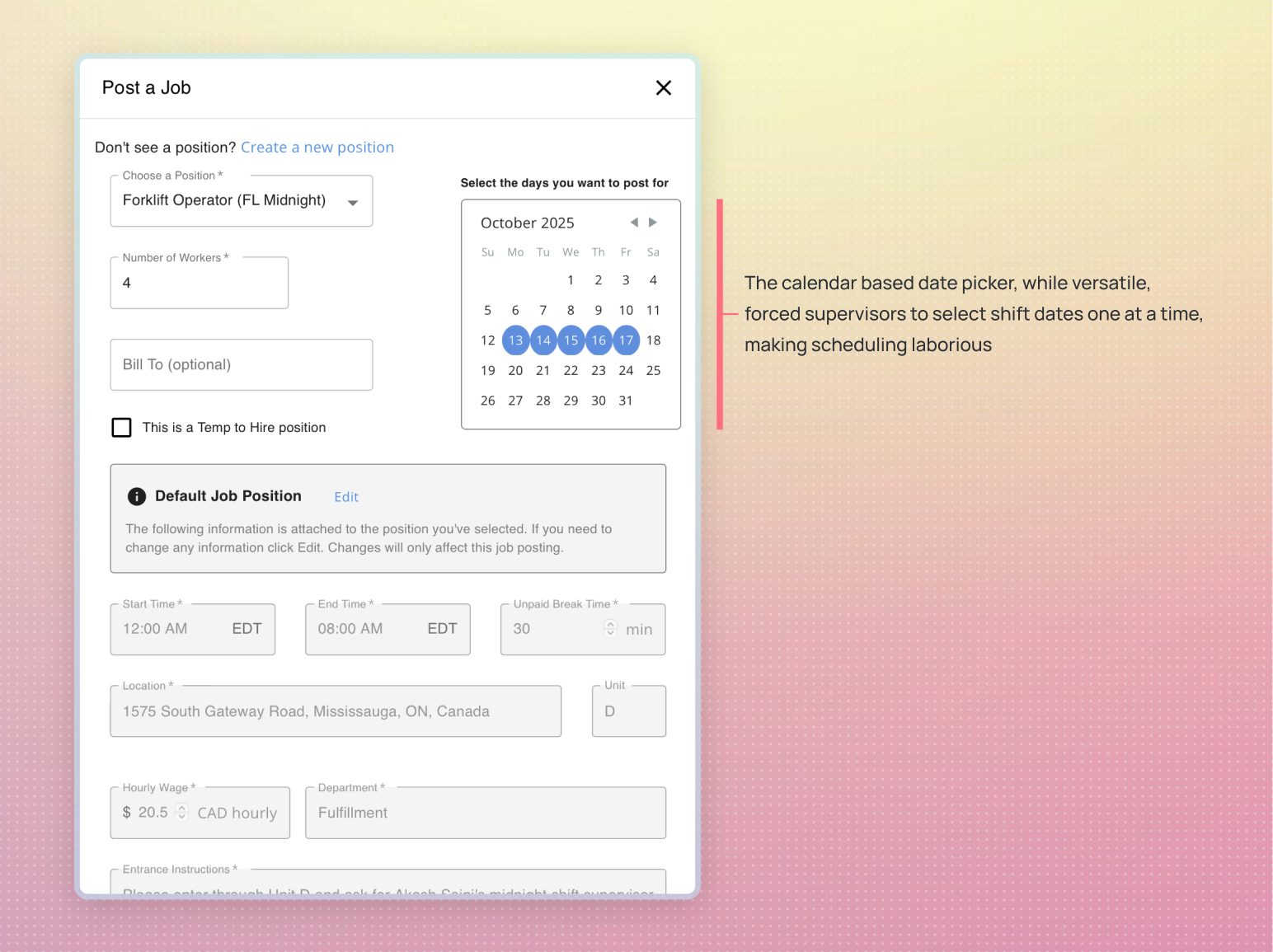
Old job posting form: supervisors had to click through the calendar and select each shift date one at a time — a slow, error-prone process.
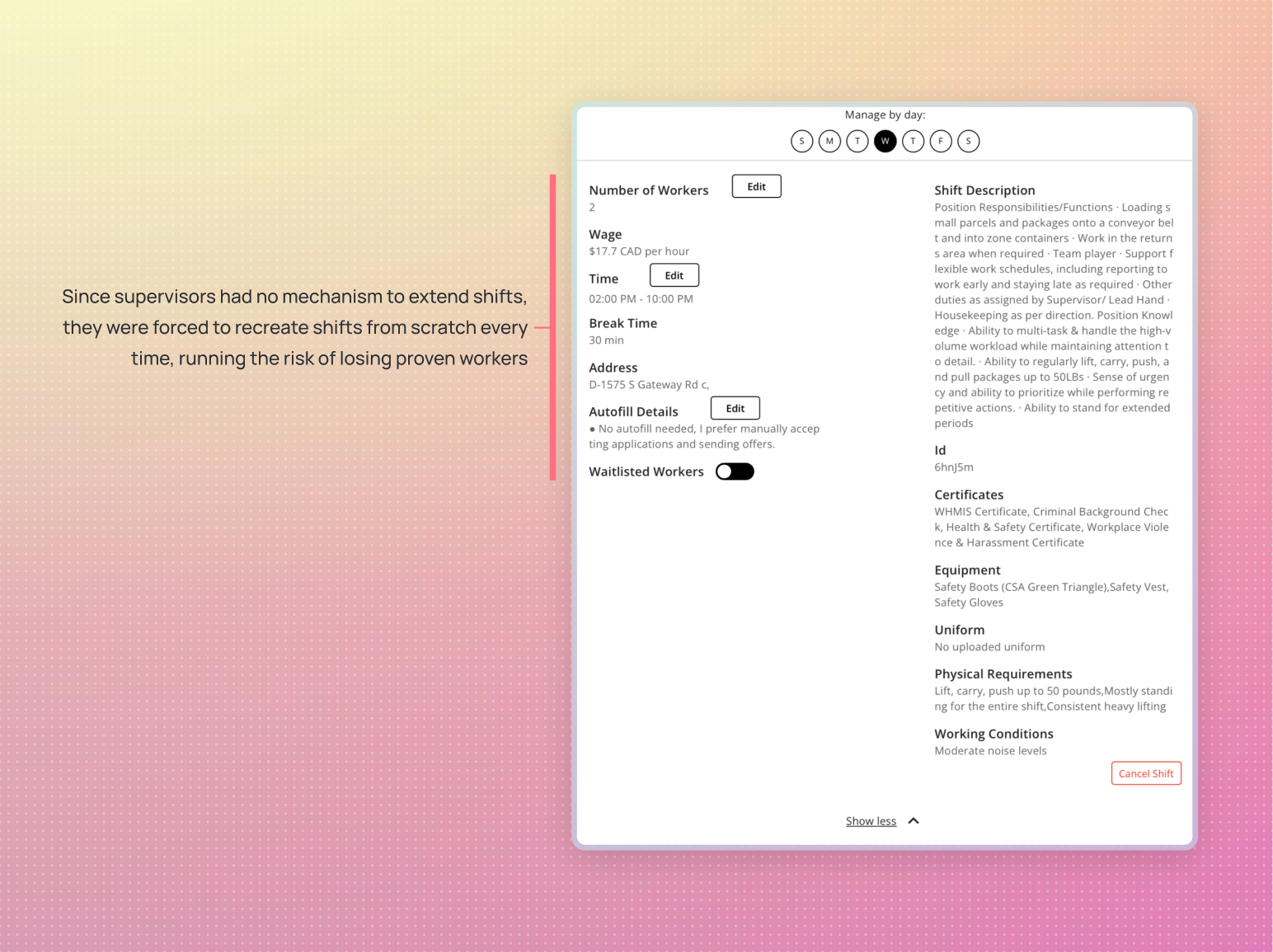
Supervisors had no way to extend ongoing shifts. Each extension meant posting a brand-new shift, often losing out on proven workers who were already reliable for the role.
1
Cumbersome Scheduling Workflow
Managers had to recreate shifts from scratch and click through each required date manually—an error-prone process that drained time and added friction to routine scheduling.
2
Challenges Retaining Trusted Talent
Managers seeking to retain proven workers had to go through the manual overhead of extending fresh offers for every extended schedule. This increased the chance of favoured workers accepting gigs elsewhere, breaking continuity in staffing.
3
Untapped Growth Potential
Every missed extension was a lost opportunity to increase GMV at zero marginal cost, and blocked a straightforward path to higher billable hours, better retention, and more efficient scaling.
To ground the solution in familiar mental models, I looked beyond staffing into adjacent scheduling experiences. Calendar and meeting apps offered a useful reference point, where recurrence patterns were the standard way to extend events without duplication. I also studied how competitors in the staffing space approached extensions, and a similar pattern emerged: most relied on weekly recurrence as the default paradigm. These observations pointed toward recurrence as an intuitive and widely accepted model that could reduce manual overhead while preserving continuity.
Implementing the commonly followed paradigm of weekly recurrence would enable managers to extend shifts with ease and reduce their manual overhead.
The underlying assumption was that following Jakob's law, users familiar with scheduling patterns on other platforms would be able to conveniently translate their existing mental models for extending shifts.
I built an interactive prototype of the new form in Protopie and ran usability sessions with a few of our trusted customers. The evaluation involved simple tasks like posting and extending shifts across regular and irregular set of dates, and handling common exceptions such as holidays.
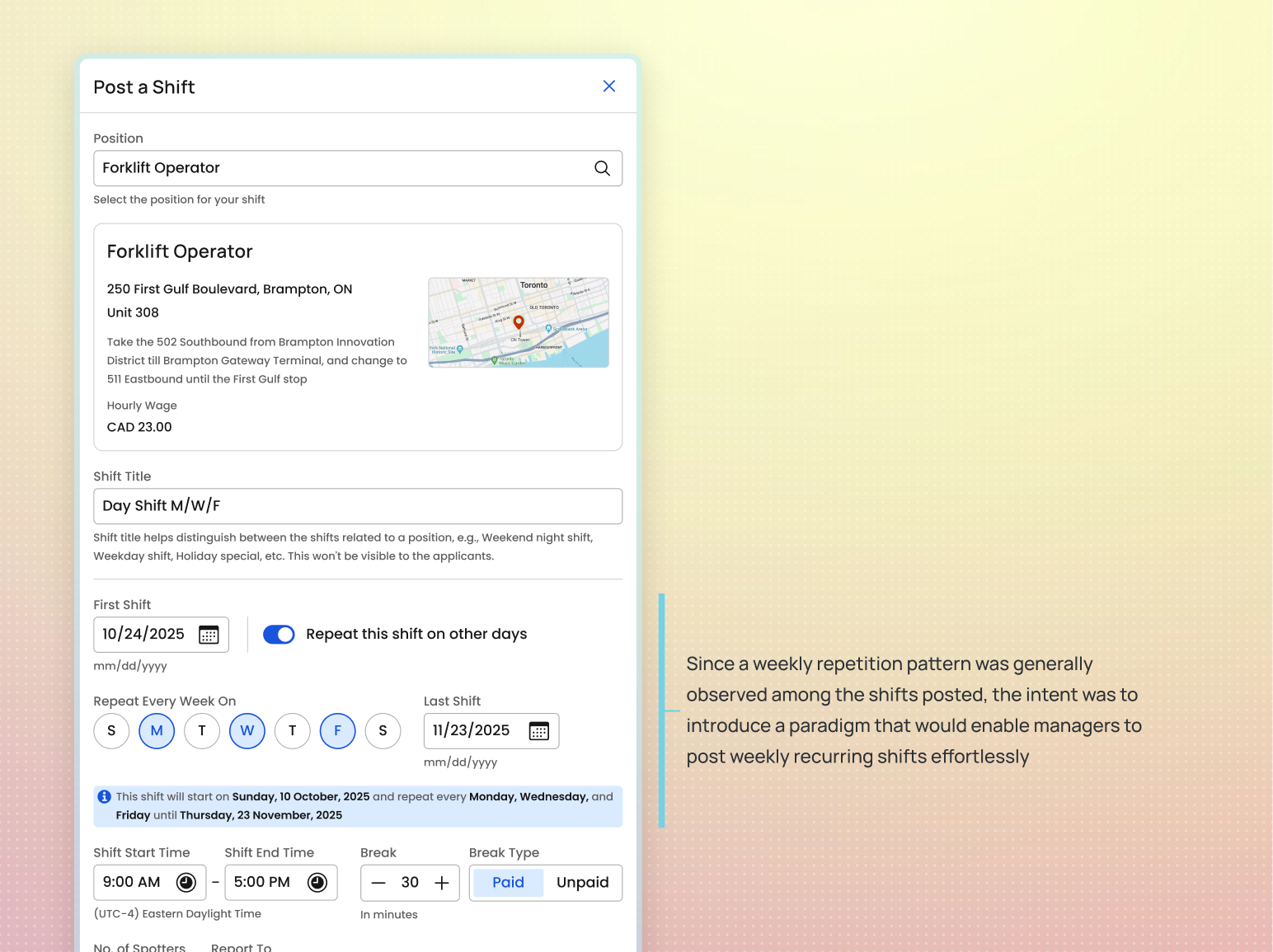
The first iteration of the redesigned form introduced weekly repetition patterns, borrowing familiar paradigms from scheduling apps to make posting repeating shifts faster and less tedious.
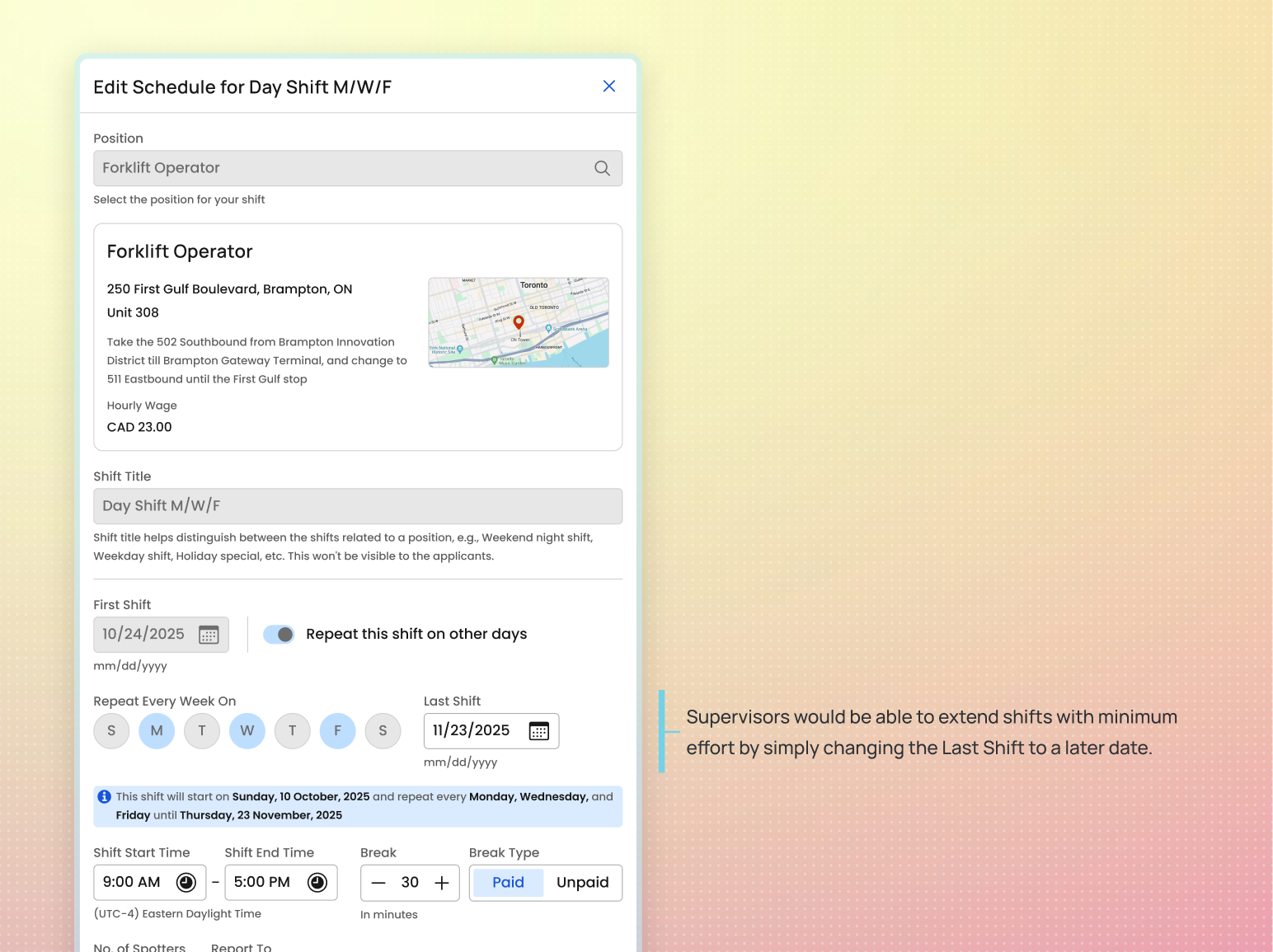
We hypothesized that if supervisors could extend shifts by simply changing the last shift date, they would save time, reduce posting errors, and retain proven workers.
The tests quickly revealed gaps between expectation and reality. While recurrence patterns seemed intuitive in theory, the supervisors struggled to draw parallels between their everyday scheduling needs and the prototype. The results challenged our initial hypothesis and signaled that a more flexible approach was needed.
Instead of embracing the new flow, supervisors showed a strong preference for the familiar calendar view.
1
Forced Weekly Symmetry
Certain schedules didn’t follow a neat weekly pattern. The new recurrence pattern forced supervisors to create separate shifts in such situations, undermining the efficacy of the new recurrence design.
2
Misaligned Mental Models
Weekly recurrence forced supervisors to think in days of the week rather than actual calendar dates, adding unnecessary cognitive load to their scheduling process.
3
Extra Overhead for Exceptions
Situations like national holidays required supervisors to go back and manually delete individual shifts, creating more work instead of reducing it.
We're currently running two [days] on, two off, three on, two off cycle for pallet feeders. Not sure how I can fit that in here.
—Matthew, a supervisor trying the form design
Armed with the findings from our usability tests, we went back to the drawing board on the post-a-shift form. We needed a design that could deliver speed and efficiency without sacrificing the way supervisors were already accustomed to working.
Design a scheduling experience that preserves the familiarity and flexibility of the calendar view while maintaining the efficiency of repetition patterns.
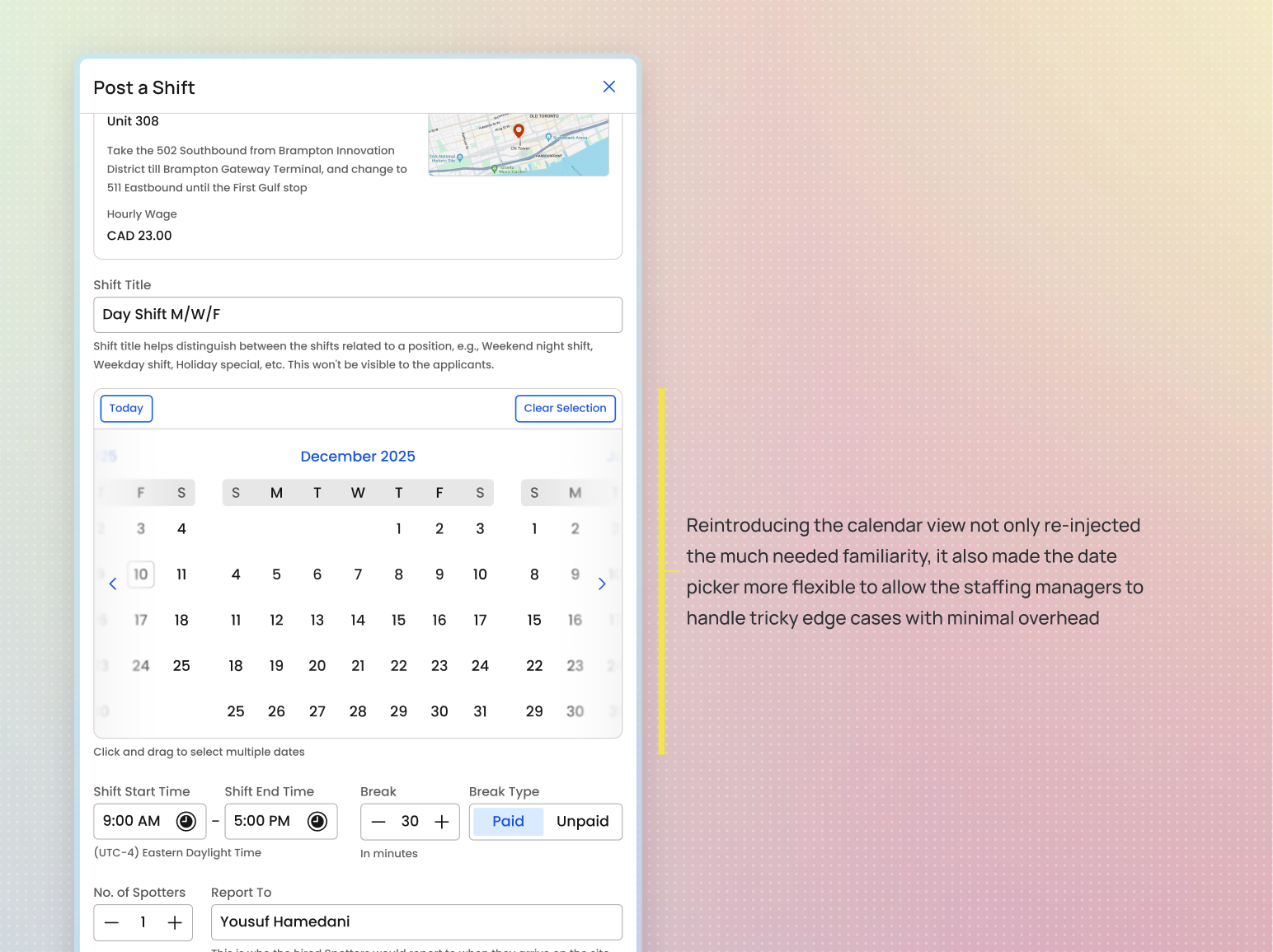
Version 2 of the redesign reintroduced the calendar view for familiarity, while adding flexibility for supervisors to post non-cyclic shifts without extra overhead.
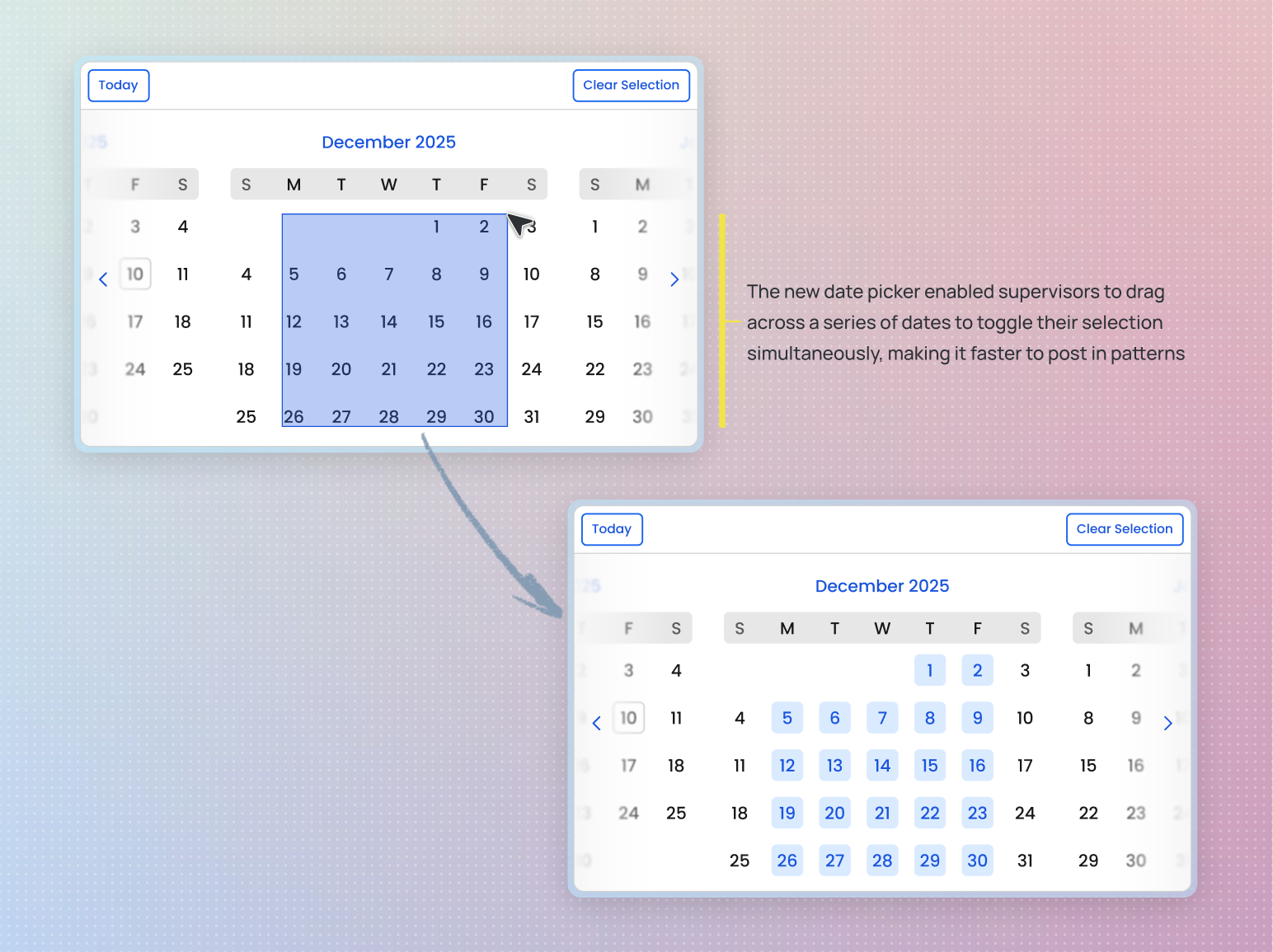
The redesigned calendar view went beyond the original. Supervisors could now drag across dates to quickly toggle selections, making it effortless to choose many dates at once.
1
Faster but Familiar Multi-Date Selection
The revised scheduling experience mimicked the calendar interaction supervisors were already comfortable with, while adding the ability to click and drag across a series of dates to quickly toggle multiple selections instead of clicking each one individually.
2
Greater Versatility and Control
While not as minimal as simply extending an “until” date in the recurrence pattern approach, the revised design gave supervisors precise control over which dates to include, reducing redundant effort and better matching their real scheduling needs.
The redesigned scheduling experience resulted in a 5% lift in fill rate, contributing to an additional 100 shifts filled among an average of 2012 shifts posted every week.
$ 377k
↑ 5%
Additional GMV contributed since launch (Mar–Sep)
The redesign is projected to contribute an incremental GMV of $550k by the end of the year, achieved at zero additional acquisition cost. That equates to approximately 4–5% of total GMV.
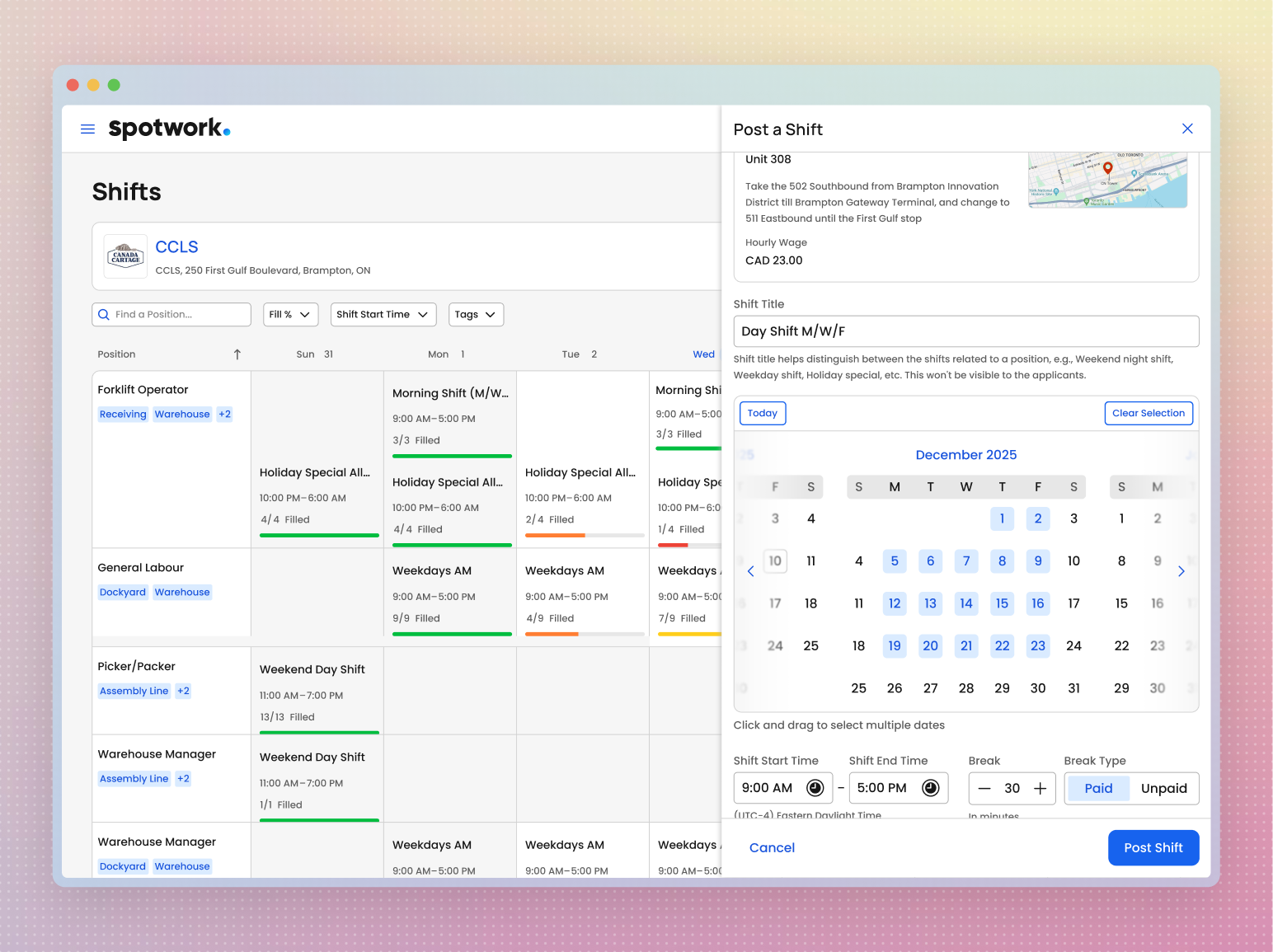
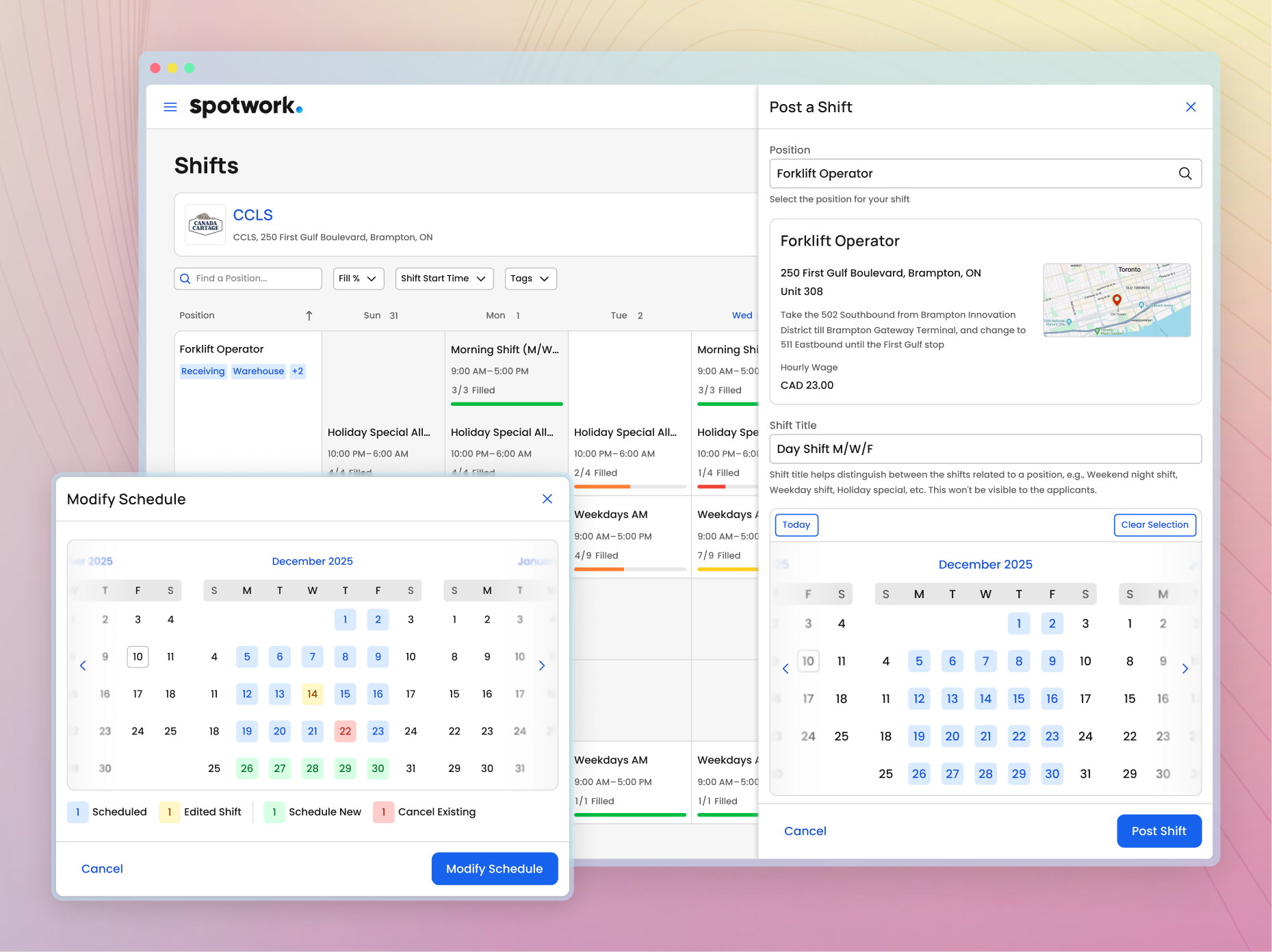
Staffing managers could now select multiple shifts in one action, turning what was once a tedious process into an extremely fast workflow.
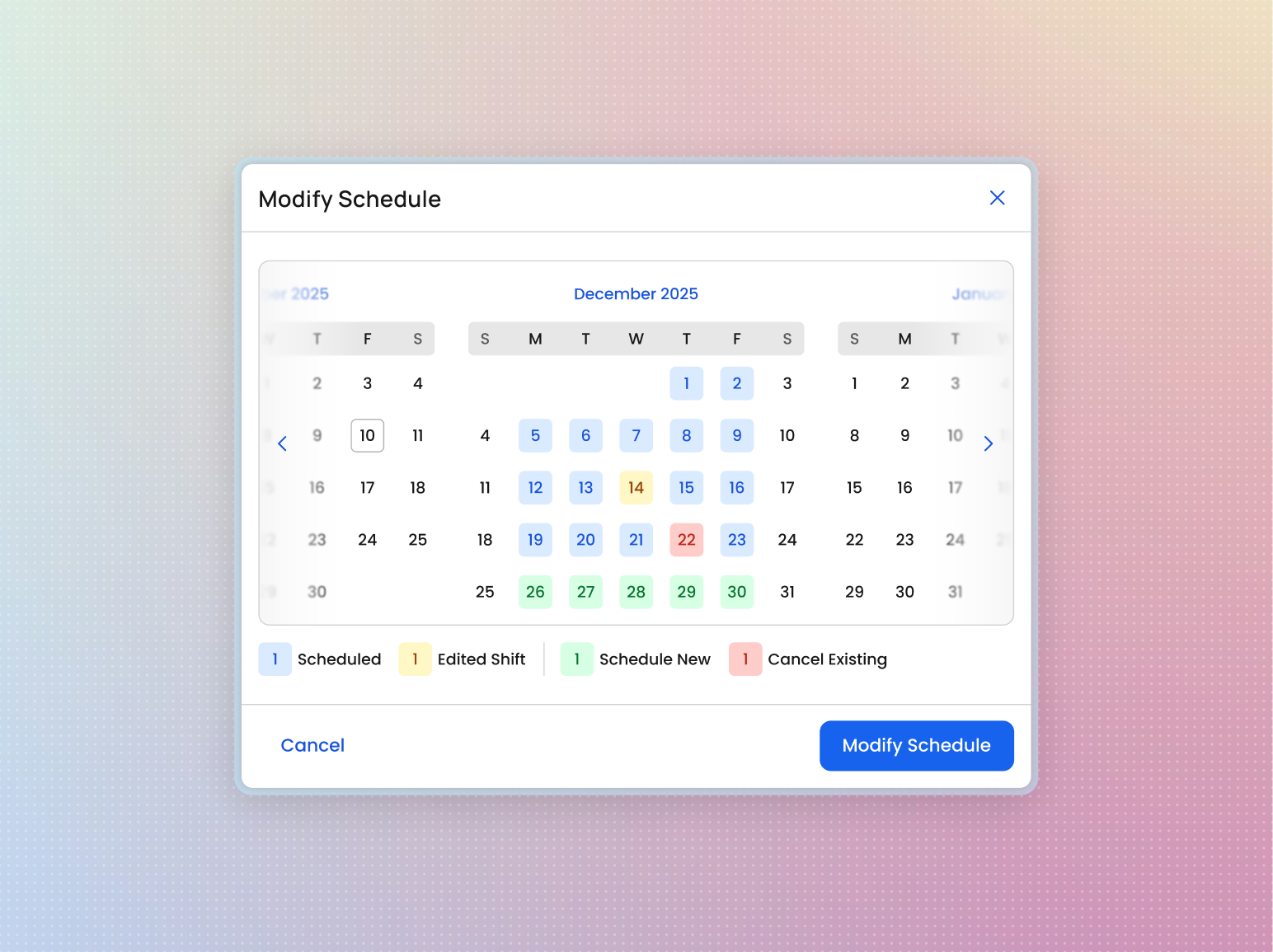
Extending shifts was also effortless. By simply opening the Modify Schedule overlay, they could now simultaneously add more shifts, and remove any existing ones they didn't need anymore.

The calendar view also doubled as a read-only schedule, giving managers a clear picture of all posted shifts with their respective dates and statuses at a glance.